
Activation and inclusion of the subscription model
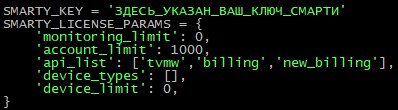
In order to start using the subscription model of internal billing, it is necessary that in the Smarty configuration file in the block of license parameters at the parameter api indicated new_billing. If there is no such value, then you need to check your license for access to the subscription model. If available, you need to specify this value and restart uwsgi.
SMARTY_KEY = 'HERE_INDICATED_YOUR_KEY_LICENSE'
SMARTY_LICENSE_PARAMS = {
         'monitoring_limit': 0,
         'account_limit': 1000,
         'api_list': ['tvmw', 'billing', 'new_billing',
         'device_types': [],
         'device_limit': 0,
}
Example of a license configuration with an activated subscription model (Option 1).
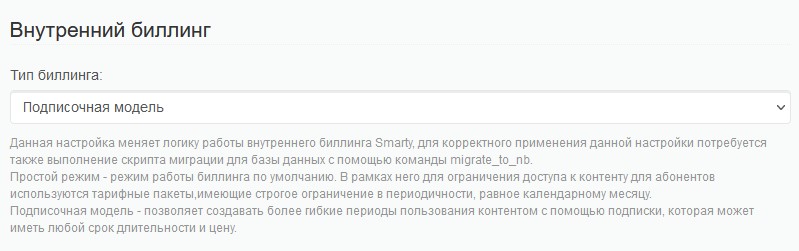
If the subscription model is included in the Smarty configuration file, then it is enough to go to the tab to activate this billing behavior "General settings" - "General Client settings" block "Inner billing" billing-type "Simple mode" on "Subscription model".
After changing the type of billing to the subscription model, it is necessary to execute a management command migrate_to_nb
smarty_manage migrate_to_nb --settings=settings.smartyThis team will create a database for a subscription billing model, and subscriptions will be created for existing users based on connected tariff plans.
Differences between subscription model and simple billing
The main difference between the subscription model and the standard one is the ability to create subscriptions with different durations of action. Subscriptions are renewed independently of each other, according to their expiration dates (starting with Smarty version 1.94).
When creating a tariff plan in the field "The Period." you can specify the duration of the subscription. This parameter will be responsible for the duration of the subscription (also, the subscription period can be changed when connecting the tariff plan through the Smarty admin, or through the Smarty admin) BillingApi methodically CustomerTariffSubscriptionCreate).
After creating a tariff plan, on the screen of its editing, you can see that in the block “Basic parameters” there are new menu elements, namely "Create a subscription by default" and Create a one-time subscription by default.
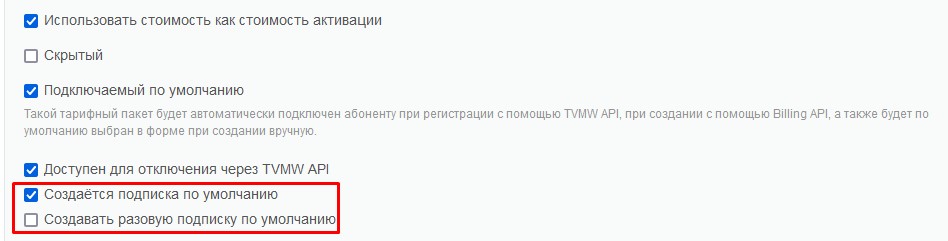
Using these parameters, you can specify which subscriptions will be connected to the subscriber when registering an account - in the first case, the subscription will be periodic, in the second case non-periodic.
Periodic subscription means that at the end of the subscription, if there are funds on the account balance, the subscription will be renewed. Non-periodic subscription in the same conditions will be disabled (this property can be used for trial rates, or for one-time subscriptions connected within the framework of any promotion).
Another important difference between the subscription model and the standard is the appearance of the field "Subscriptions" on the Smarty admin screen "Subscriber information". This field displays all subscriber subscriptions, as well as information about these subscriptions - name, their validity period, whether this subscription is periodic or not and whether it is active.
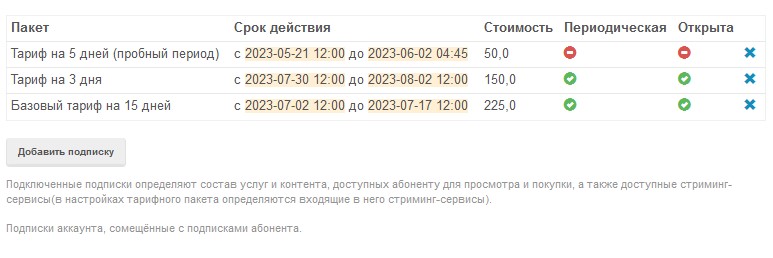
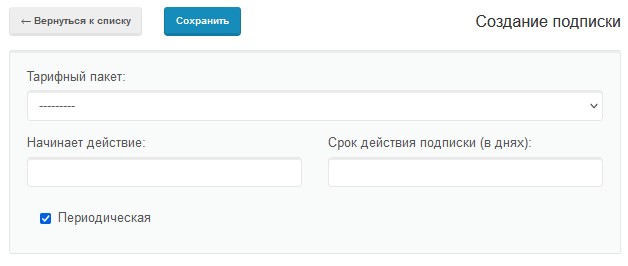
In the same block, it is possible to add a subscription to the subscriber by previously changing the subscription settings (or leaving these settings by default). By clicking on the “Add Subscription” button, a window opens where you can select the tariff package and specify the parameters for the subscription.
Smarty configuration options for the subscription system.
BILLING_CHECK_NON_BASIC_SUBS This option is responsible for the dependence of account activation on the availability of a subscription to the basic tariff. Prix True true the account remains active regardless of whether it has a subscription to the basic tariff or not (the account is deactivated only at the end of all subscriptions). Prix False check for the base rate – if there is no subscription to the base rate or it has expired, the account will be deactivated (regardless of the fact that the account has a subscription to other tariff plans).BILLING_ACCURATE_SUBSCRIPTIONS This option is responsible for setting accurate time stamps for activation / deactivation of the subscription. Prix False the start time and end time of the subscription will always be the same (12:00 the day the subscription was activated and 12:00 the day the subscription will be deactivated, respectively). Prix True true the exact activation time will be indicated.
