
Stand-By or sleep mode is a mode of saving energy consumed by the device.
Due to the fact that not all devices allow you to call a system sleep mode at the application level, this functionality was implemented by internal Smarty tools. For such devices, instead of a full transition of the device to sleep, the player is stopped and access to the main screen of the application.
List of main devices and their behavior with Stand-By mode enabled
- For type devices LG WebOS, LG Netcast, Samsung TizenTV, Samsung Smart TV (Orsay), Android_STB stand-By mode is used, implemented by Smarty.
- On devices TVIP, Dune, WRT (Linux), Eltex (Linux), MAG (Linux) internal capabilities of sleep mode are used (when the device is switched off).
- Stand-by mode is not supported on mobile devices.
How to activate Stand-By mode
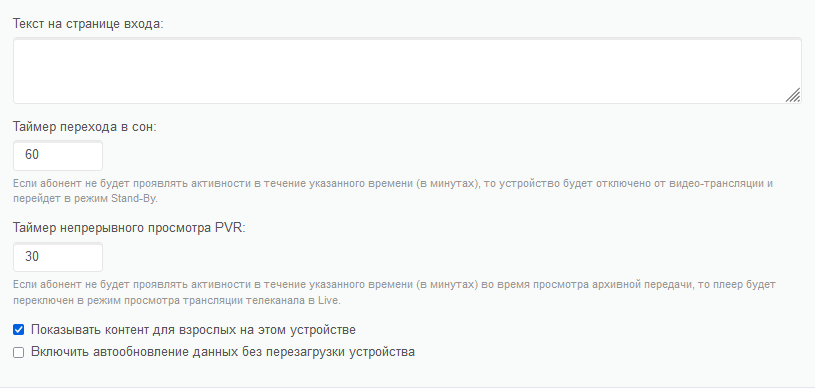
Stand-By mode can be enabled on the General Settings page - STB and Application Settings Smarty. In the settings of each device there are 2 parameters associated with Stand-By mode, namely:
- The sleep transition timer is a timer for Stand-By mode. It indicates the time (in minutes) after which the broadcast will stop and move to the main screen, if no active actions were taken by the user.
- Continuous viewing timer PVR - the time (in minutes) of continuous viewing of archival programs after which the transition from the archive to Live will be made (if the archive is launched from a separate screen menu, then the transition to the main screen will be made with the setting of the archive for a pause).
Block_requests_in_standby option for Stand-By mode
For Stand-by mode there is a portal option block_request_in_standby If this option is enabled, then, when the portal user switches to Stand-By mode, sending requests from his device will be disabled until activity resumes.
